Showing posts with label china. Show all posts
Showing posts with label china. Show all posts
Saturday, 7 June 2014
Friday, 6 June 2014
my phone m55 auto charging solution by moheuddin
1st rehot Red marked area
problem not solve
change Red marked all parts


how to write imei mtk android no box no rx tx,usb only by ashakaas
How To Solve Without Debag & Flash SPD Android Google,Patten,Pin,ETC & Hang On Logo
SPD Android Tutorial
How To Solve Google, Patten, Pin, ETC Lock
&
Hang On Logo
Without Usb Debag Enable & Without Full Flash
How To Solve Google, Patten, Pin, ETC Lock
&
Hang On Logo
Without Usb Debag Enable & Without Full Flash
1st You Need :
- ResearchDownload_R2.9.7006 Or Latest
- You Need Factory Backup (You Can Do With Any Tools Or Script Backup )
- Now You Need FLD1 , FLD2 & UserData This 3 File Only
Q: I need backup From Same phone ?
A: If you have same phone , That Better
Q: I don't have same phone Also don't have same Backup , I can Use any Backup ?
A: Yes You can But Better If you use same Company Phone , If Dont Have You Can Use Any One
Same Company Example - If your lock phone is Qmobile So Use Qmobile Backup , If Lava Use Lava , If Micromax Use Micromax , If Symphony Use Symphony Backup
Note - If You use Same Phone Backup Then You Can Solve 100% without Any Problem
Q: Its Risky ?
A: I Already Do But Not Dead , Not hang On Logo . But Better If You Take Risk
Q : Did You try It With Other Phone Backup ?
A: Yes . I did . See Here : SPD ANDROID Analysis flash internal data fail (Google Lock ) Done By AzimBahar
How to Crate This File (PAC Or RESET File ) :
MostImpotent

Must Be Flow It , On Gide Have Little Mistake
Open ResearchDownload.exe
Now Click To Setting

Now Unmarked All Select File ,Select Your Chip & Select Baud Rate

Now Select FLD1 , FLD2 & UserData File

FLD1 , FLD2 & UserData Select Done . See UserData Marked , Its Must Be Mark

Now Click to Packet & Click Yes

Again Click Yes

Select Product Version (File Name) , Saving Pach & Click Ok

Your PAC File Crate Done

Now You Can Flash With This File
Saturday, 16 November 2013


Thursday, 14 November 2013


SYMPHONY FT05 SENSOR TOUCH TO NORMAL TOUCH CONVERT SUCCESS
SYMPHONY FT05 & ZEN-M45 SENSOR TOUCH TO NORMAL TOUCH CONVERT
SUCCESS


this sensor touch not available in market

1

THIS NORMAL TOUCH AVAILABLE IN MARKET
2

3

ANYONE HAVE THIS MOBILE TRY THIS SOLUTION & POST RESULT
SUCCESS
this sensor touch not available in market
1
THIS NORMAL TOUCH AVAILABLE IN MARKET
2
3
ANYONE HAVE THIS MOBILE TRY THIS SOLUTION & POST RESULT
Tuesday, 12 November 2013

Monday, 4 November 2013

Saturday, 2 November 2013
Tuesday, 1 October 2013


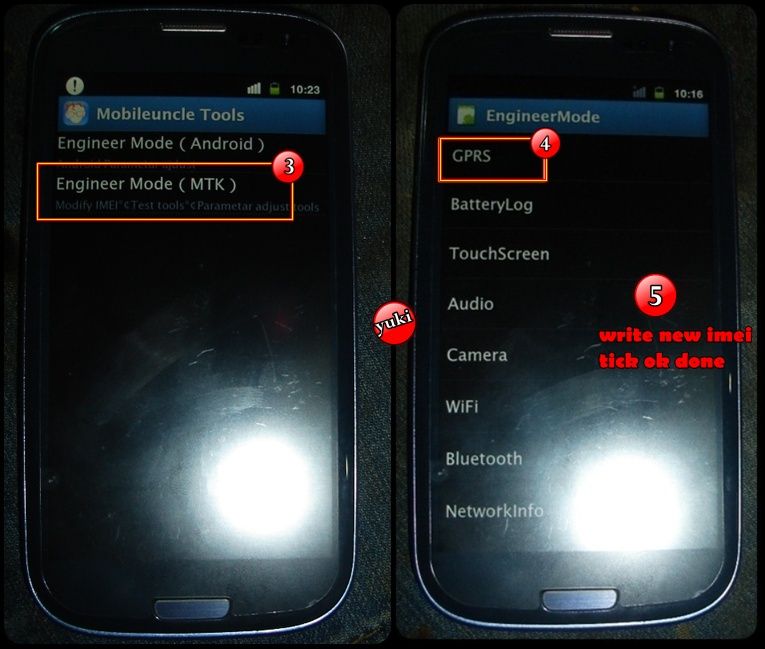
Mtk android write imei without box..tricks
2 WAYS TO SOLVE IMEI PROBLEM
1.


restart phone

*#*#3646633#*#* MODE
MANUALLY install this ---------> Mobileuncle yuki - Download - 4shared
FOLLOW


other option
For changing the IMEI you need this following things -------> Mobileuncle yuki - Download - 4shared
1.
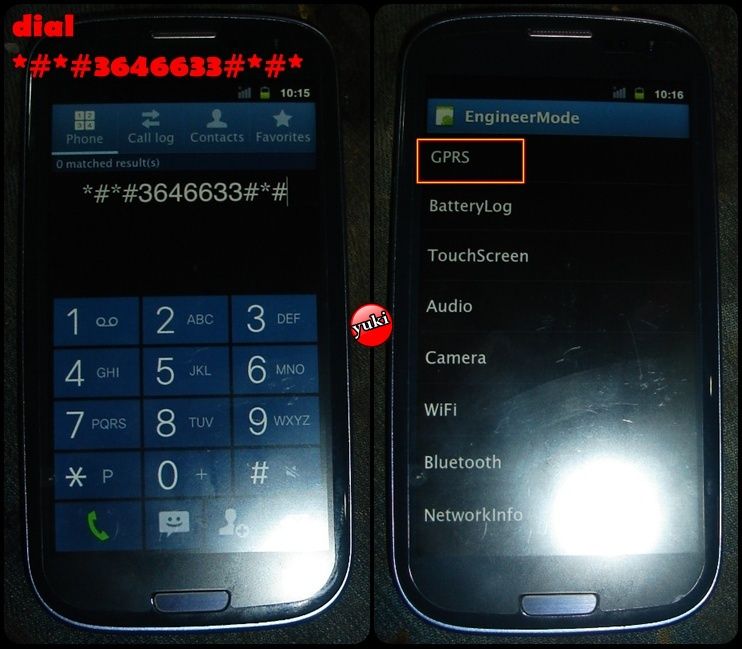
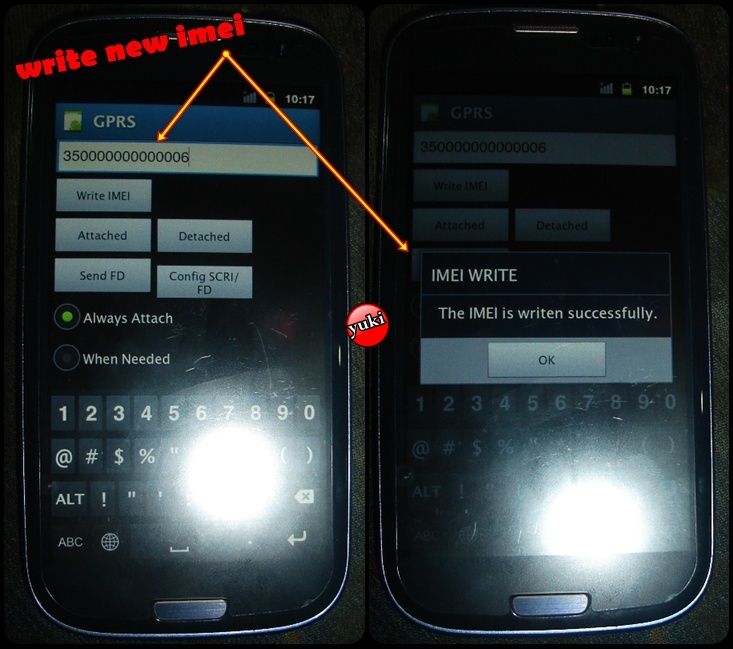
restart phone
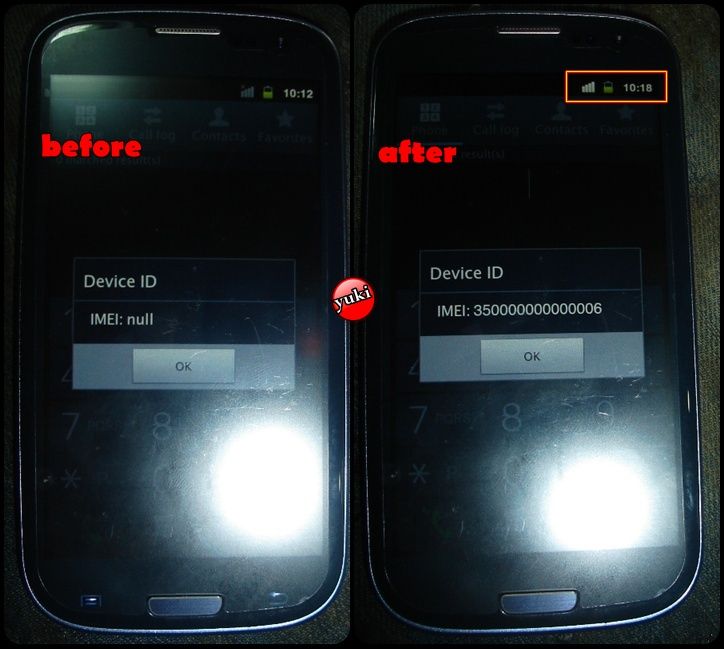
*#*#3646633#*#* MODE
MANUALLY install this ---------> Mobileuncle yuki - Download - 4shared
FOLLOW
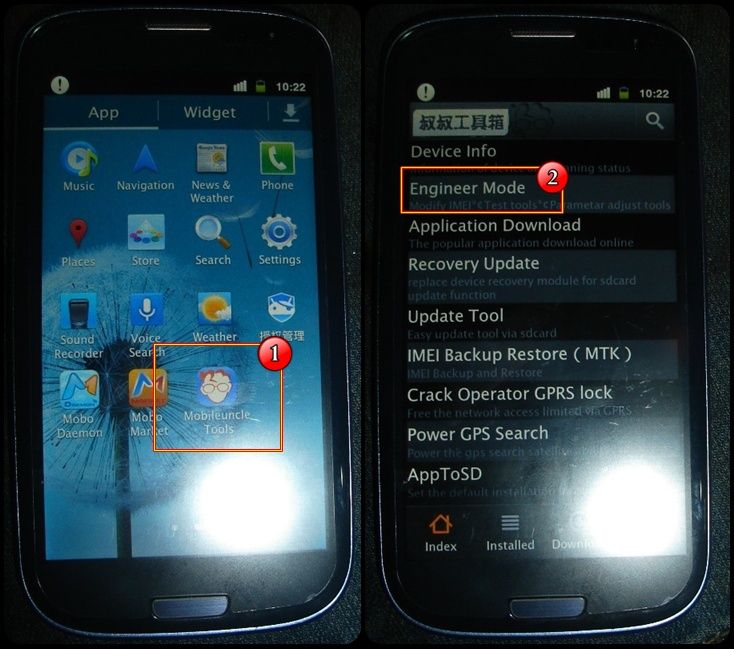
other option
For changing the IMEI you need this following things -------> Mobileuncle yuki - Download - 4shared
Subscribe to:
Posts (Atom)


